Manual Creation
Manually creating an agent gives you full control over all components. It is suitable when you have special requirements, want to make individual configurations, or already have experience with agent configuration.
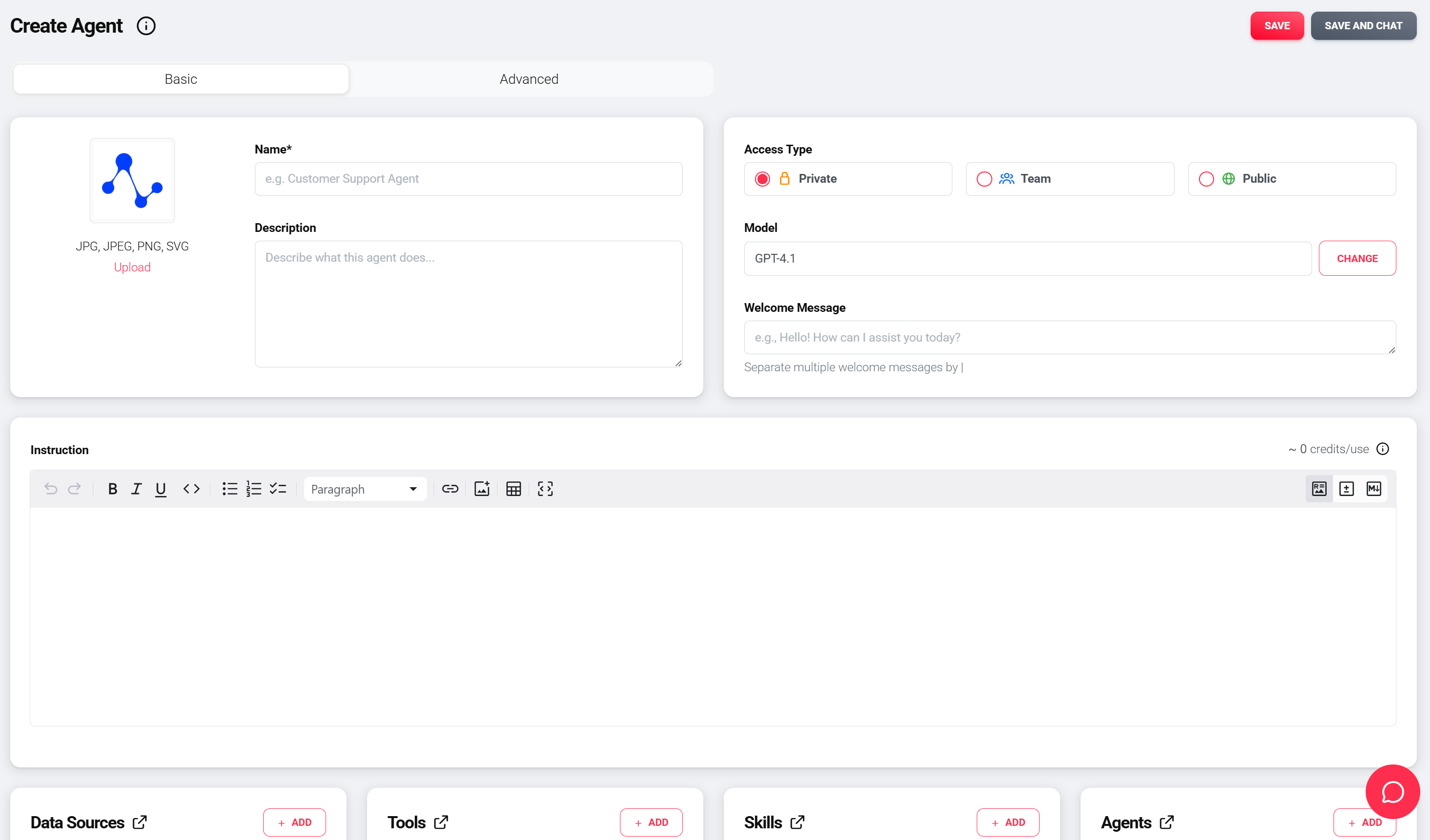
Base components of an agent
An agent consists of the following components. Each component can be configured and activated independently:
| Component | Description | Details |
|---|---|---|
| Basic Settings | Name, description, image, greeting message, and visibility of the agent | Basic configuration |
| AI Model | The language model that drives the agent – determines understanding, answer quality, and processing | Selection and configuration |
| Prompts | Instructions that define the agent's role, tasks, style, and limits | Prompt structure and best practices |
| Data Sources | Additional knowledge from documents, websites, files, or APIs | Types and configuration |
| Tools | Extend the agent with specific actions (email, API, image generation) | Tool types and activation |
| Skills | Collections of capabilities (e.g. Word, Excel, PDF) – loaded dynamically | Use and configuration |
| Subagents | Collaboration with other agents for complex workflows | Configuration and best practices |
Further settings
The Advanced Settings offer fine-tuning of model parameters, logging, integration, and security.
Activating components
Activation required
Data sources, tools, skills, and subagents must always be activated in the agent's edit screen. An assigned component only takes effect when it is switched on there.